
Basic Auto-Play Settings
An easy-to-use Auto-Play function from James Greene for your CDs and DVDs
|
Basic Auto-Play SettingsAn easy-to-use Auto-Play function from James Greene for your CDs and DVDs |
 Previous Previous |
Next |
    [AutoPlay Data]
    Document=INFO.HTM
    BrowseLocalFile=0
    Viewer=IEXPLORE.EXE
    WindowMode=Normal
    ForceViewer=0
    TopMost=1
    LegalNoticeCaption=Legal Notice
    EULA=OurLicense.RTF
    SimpleAccept=0
    LegalNoticeText=This media contains licensed materials.
    LegalNoticeTextLen=50
    Copyright=Copyright © James Greene 1999-2016
    OEMName=Registered Company Name
    Registration=xxx-xxxxxxxx-xxxxxxxx-xxxxxxxx-xxxxxxxx
    DirFix=1
where
| [AutoPlay Data] | required | Identifies the beginning of the Auto-Play-specific settings in the AUTORUN.INF file. | |||||||||||
| Document=somedoc.ext | optional | The name of the document to be opened. If ForceViewer=0, then Auto-Play first tries to open the specified document using the local machine's association. For example, if the machine has Microsoft Word installed, and you specify Document=README.RTF, the document will be loaded by Word, even if the Viewer=WORDPAD.EXE has been specified. | |||||||||||
| BrowseLocalFile=0 or 1 | optional | This option specifies if the document will be viewed in a
browser. If this option is set to 1, Auto-Play will convert the
document name to a URL (e.g. "file:///d:/index.html"). Default: BrowseLocalFile=0 |
|||||||||||
| Viewer=program.exe | optional | This option specifies the program to be used if the machine
does not have an application associated with the specified document,
or when ForceViewer=1. If the program name contains spaces, enclose
the program name in TWO sets of double-quotes, e.g. ""C:\Program Files\Internet Explorer\iexplore.exe"" |
|||||||||||
| WindowMode=mode | optional | This option specifies how the Document or Viewer application
window should be displayed: Maximized, Normal, or Minimized. Default: WindowMode=Normal |
|||||||||||
| ForceViewer={0 | 1} | optional | If this option is set to 1, the program defined
as the Viewer (above) will be started, ignoring any association the
user may have for the given Document type. In other words, if the user
has associated .HTM documents with their favorite browser, but your
CD-R requires a specific browser (which you've included on your CD-R),
setting this value to 1 will start the Viewer defined above with the
given Document as a command-line parameter. If ForceViewer=0 (the
default value), Auto-Play will first try to launch the Document, and
if this fails, then it will launch the specified Viewer. Default: ForceViewer=0 |
|||||||||||
| DefaultAction=command-line -or- DefaultAction=ECHO message |
optional | This value defines what Auto-Play should do when
neither the Document nor the Viewer cannot be started. The
command-line can contain a program name and parameters, e.g. notepad
readme.txt, or simply a document name, e.g. readme.txt. If ECHO is
specified, all text following the ECHO command will be displayed in a
message box. If this value is not defined, then Auto-Play will display
the Windows error message why the document could not be started, e.g.
"The specified file could not be found." Default: DefaultAction=(not defined) |
|||||||||||
| LegalNoticeCaption=window title | optional | This value, together with LegalNoticeText,
specify that Auto-Play should display a legal notice that the user
must read and click OK before they can continue. This value
specifies the title for the legal notice message window. Default: same as CDTitle |
|||||||||||
| EULA=RTF or text file | optional | If this value is specified, Auto-Play
will ignore the LegalNoticeText
setting, below. This value defines the path and file name of the file
containing an end-user license agreement or similar information. The
contents of this file will be displayed to the user, who must
acknowledge that they have read, understood and agree to the terms
before the specified Document or Viewer is launched. Example: 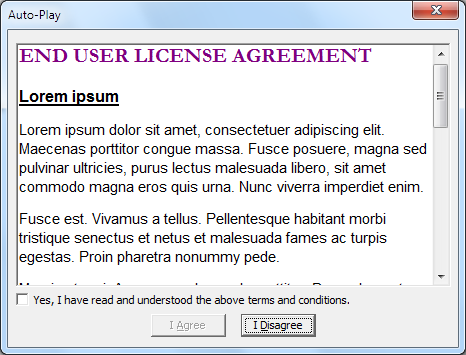 Default: (empty) |
|||||||||||
| SimpleAccept={0 | 1} | optional | Setting this value to a non-zero value will
instruct Auto-Play to hide the "Yes, I have read and understood the
above terms and conditions." checkbox from the EULA display, so that
the user can continue by simply clicking I Agree.
If this option is not specified or set to zero, the user must first check the "Yes, ..." checkbox to enable (activate) the I Agree button. Example: SimpleAccept=0 (default value)

SimpleAccept=1

Default: 0 |
|||||||||||
| LegalNoticeText=text | optional |
This value specifies the text of the legal notice that Auto-Play should display. The user will be presented with this text and the option to click Yes or No. If the user clicks No, Auto-Play will exit immediately, without launching the selected Document or Viewer. This text can now be up to 16 KB (about 16,250 characters) in length. (But if you have that much text, you really should consider using the EULA option, above.) Since many editors do not support very long text lines, this text can be split across multiple lines as shown in the example below. Example: LegalNoticeText=The first
line of text\n\ will appear as: 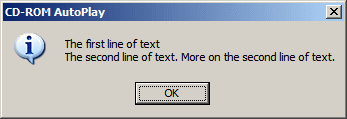
Please note: This text can contain line breaks and other special characters. Please consult the Copyright entry for more information. Default: (empty) |
|||||||||||
| LegalNoticeTextLen=number | optional | This value specifies the length of the legal
notice display text. If not specified, this value defaults to 512 (for
backward compatibility reasons).
Default: 512 |
|||||||||||
| DirFix={0 | 1} | optional | Set this value to 1 when Auto-Play.exe is placed
in a subdirectory with a separate AUTORUN.INF file. With this setting,
Auto-Play is able to find files that are specified in other folders,
e.g. Music=...wav
Default: DirFix=1 |
|||||||||||
| TopMost={0 | 1} | optional | This value is normally set to 1. Set this value
to 0 if the Auto-Play splash screen should NOT be marked as a TOPMOST
window, in other words, if the splash should disappear behind any
windows that subsequently open.
Default: TopMost=1 |
|||||||||||
| Copyright=copyright text | optional | This option specifies the copyright owner for
the media, and will appear at the bottom of the 'splash' dialog box.
This string may contain the code \n for a new-line, for a hexadecimal
character code, or nn for an octal (base 8) character code. For
example Copright \xa9 1999-2016\nJames
Greene will be displayed as:
since the copyright symbol © has the ASCII code 169 = A9 (hex) = 0251 (octal). In other words, this could be written as \#169, \xa9 or \0251. The following 'escape' sequences can be used to include special characters in the text:
Default: Copyright=Auto-Play is Copyright \xA9 1999-2016 by\nJames Greene |
|||||||||||
| OEMName=company name | Professional Version only | When you register a commerical license for Auto-Play, you are entitled to use any text you wish for the Copyright= setting. Your commerical registration key is generated from the company name that is entered here. | |||||||||||
| Registration=registration code | Enter the registration value that you received
when you registered Auto-Play here, or leave it blank if you are still
evaluating Auto-Play.
Please Note: The registration keys for Auto-Play have changed. Beginning with version 3.0 (build 120), Auto-Play is using the Whirlpool cryptographic hash algorithm to generate and check the registration key validity. Users with a valid Auto-Play v2 or earlier license key should contact the author to receive a new v3 license key. The upgrade to v3 is free of charge. |
Copyright © 1999-2016 by James Greene. All rights reserved. Information subject to change without notice.