
Overview



|
What is CBText?CBText is a Windows utility that will reduce the contents of the Windows Clipboard to plain text (if possible), and provides "Clippings" which can be quickly loaded into the Clipboard whenever they are needed.
Why CBText?Many Windows applications place formated text in the Clipboard, while all you wanted was the plain text. When pasting the clipboard contents into another application, you either have to use the "Paste Special..." command, or reformat the text again. With CBText, a simple double-click on the taskbar symbol will reduce the clipboard contents to plain text, so that the Paste command will paste the text only. |
Release History
| 6.0.200 | 12-Feb-2018 | Added the ability to synchronize and manage Clippings to the Cloud (registered version only). |
| 5.0.100 | 21-Feb-2016 | Complete rewrite. Added "Clippings" function. Additional "Viewer" functionality. |
| 4.0.050 | 18-Apr-2006 | Enhanced "Viewer" functionality. Added the Exit dialog. |
| 3.0.044 | 8-Apr-2004 | Added the "Options" dialog and basic "Viewer" functionality. |
| 2.1.040 | 29-Mar-2004 | Added the "Keep UNICODE" option for registered versions. |
| 2.0.036 | 12-Jan-2003 | First major update. Automatic conversion option, Undo, etc. |
| 1.1.018 | 04-May-2001 | Minor cosmetic improvements. |
| 1.0.015 | 29-Apr-2001 | Initial Shareware release. |
Download
Downloading CBText
-
Download the cbtext/cbinstall60.exe file from
http://www.informatics-consulting.ch/software/cbtext/cbinstall60.exe
(Switzerland) or
http://www.informatics-consulting.de/software/cbtext/cbinstall60.exe (Germany)
and store it into a temporary directory, e.g. C:\TEMP
- Double-click on the cbinstall50.exe file to install CBText.
The cbinstall50.exe program is a delivery shell for the cbtext50.msi installer. The following options are available with cbinstall50.exe:
--extract (or) /X| Extracts the MSI file only (without starting the installation).
| --dir (or) /D [path] | Specifies where the MSI file should be stored.
| --keep (or) /K | Specifies that the MSI file is not deleted after installation.
| --quiet (or) /Q | Hides the progress window (in implies --keep).
| --version (or) /V | Displays the version information for both CBText and the installer.
| --help (or) /? | Displays these instructions.
| |
The registered version of CBText has an option to automatically start CBText when Windows starts, so that it is always available in the Windows taskbar.
After trying CBText for 30 days, if you like what you see and would like to continue using it,
please Register your copy to unlock its full potential! Thank you!
Register
Why Register?
The following table shows some of the features that are enabled when CBText has been registered:
| Feature | Shareware | Registered |
|---|---|---|
| Convert the Clipboard contents to plain text. |  |
|
| Convert the Clipboard contents to plain text automatically. |
| |
| Convert the Clipboard contents to upper or lower case. | | With UNDO |
| Empty the Clipboard: | | With UNDO |
| View the Clipboard contents: | |
|
| Store permanent Clippings: | 3 | 10 |
| Permanent Clippings format: | Text | Text, Rich Text, HTML |
| Permanent Clippings size: | 750 chars | 2000 chars |
How to Register
The personal license for CBText costs only EUR 9,50. Just click the Buy Now button above to order on-line via BMTMicro.
For more information about bulk or corporate licenses, please contact the author (see below).
Screen Shots
Screen Shots
 |
|
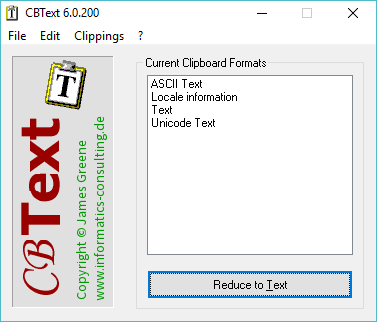
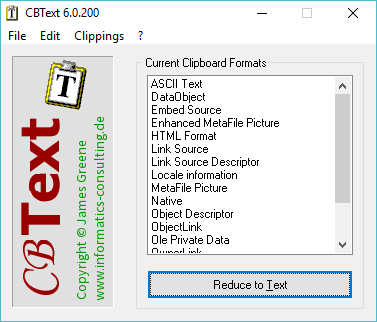
| I copied some text from a MS Word document ... | ... and clicked the "Reduce to Text" button. |
For more information about the full range of features, Download CBText and try it out for 30 days. If you like what you see and would like to continue using it, please Register your copy to unlock its full potential! Thank you!
Documentation
v5.0.100 - 21. February 2016
- New functionality: Stored Clippings.
- Clippings: A new menu shows stored Clippings that can be loaded into the Clipboard.
- Clippings: The new Clippings menu is also available for quick selection when CBText has been minimized to the task bar.
- Clippings: The Manage Clippings dialog has been added. Clippings can be renamed and/or deleted here.
- Clippings: The Undo option is available when a Clipping is loaded (for both registered and unregistered versions).
- Clippings: The registered version of CBText supports up to 10 Clippings of up to 2000 text characters. Each Clipping is stored as plain text, rich text (if available) and HTML (if available).
- Clippings: The shareware version of CBText supports three Clippings of up to 750 characters in length. The shareware version only stores the plain text.
- Major update of the View functionality.
- View: PNG and JFIF (JPEG) images are now shown as images.
- View: Rich Text Format text is shown as formatted text.
- View: New option Show Source displays the source of the image files as hex bytes.
- View: The dialog window was re-arranged to show a larger version of the image.
- View: The scaling routine was corrected so that the images should now be scaled correctly in the window.
- View: Added the [+] button to create a stored Clipping.
- Other changes
- The main window now shows the current Clipboard formats sorted alphabetically.
- The Options dialog is now accessed via the File menu, instead of having its own menu. The old menu location is now used for the Clippings menu.
- The registration codes are now using the Whirlpool encryption algorithm. Registration codes from earlier versions of CBText will not be recognized in this version. License upgrades will be available free of charge - just send your CBText v4.0 license information to the author and I will reply with a Version 5.0 license key, normally within 48 hours.
- Added a new "Credits" button to the "About" window to show the versions and copyright information of libraries used in CBText.
- All (URL and E-mail) links now point to informatics-consulting.de instead of informatics-consulting.ch, although both continue to be maintained.
- The graphics have been revised to more closely match the Windows 10 color scheme.

